 |
Showing posts with label Teletherapy. Show all posts
Showing posts with label Teletherapy. Show all posts
Thursday, August 6, 2020
Teletherapy: What to Do the First Week of School

Sunday, May 17, 2020
Teletherapy: Summer Speech Homework Using Shared Folder in Drive

Steps for Making a Homework Folder in Drive
1.
To create your folder, go into your Drive.
2.
Then left click NEW, then left click FOLDER. You
will see a box called New Folder. Name your folder then select CREATE.
3.
Once created, it will show up as folder in your
Drive. Double click on the folder and a large circle that says, DROP FILES HERE,
will appear.
4.
You can upload PDF’s and Documents into the
folder. Within the folder, you can create sub folders for specific areas such
as articulation of language activities.
5.
To create sub-folders within the Homework Folder,
right click in the empty folder and a box with options will appear. Select NEW
FOLDER and name it to create the sub-folder. The great thing about using the
folder is that you can add to it at any time. Many parents may not have a
printer or want to print out worksheets. Uploading colorful NO PRINT
activities, as long as you have Terms of Use permission, can be an effective
solution for families on the go. If parents have Drive as an app on their phone
or tablet, they will be able to access full color activities on their devices.
6.
To share the folder with families, you will need
to right click on the folder name. You can do this a couple of ways. You can
right click on the folder as it appears with your other folders in Drive or if
you have already opened the folder, click on the drop down arrow next to the
name of the folder. Right click on SHARE. Click on CHANGE.
7.
You will see a drop down next to ANYONE WITH THE
LINK can view. Copy the link to share with your families.
8.
You can also right click on the folder and
select GET SHAREABLE LINK. If link share is OFF, slide the button right so it
turns green then the link will be copied to your clipboard and you can paste it
into an email or document.
9.
Below is a link for an editable calendar that
can be used to created customized calendars that can be saved as PDF’s and
added to a shared activities folder in your Drive. The second link is for a NO
Print Calendar that is also editable in Google Slides and can be uploaded into
a shared folder.
 |

Teletherapy: Support for Speech Therapy Home Practice

Sunday, April 19, 2020
Teletherapy Materials: Making Board Games in Power Point

This
process is for making your own materials for personal use ONLY—not
for making materials to sell! Click below for a FREEBIE game board with movable pieces!
1. Open Power Point.
2. Delete text boxes that automatically
come up on a new slide.
3. Click on Design tab at the
top. Go all the way to the right and select Slide Size.
4. Chose Standard Size for more
of a square look or Widescreen for a more elongated look.
5. Next, choose Format Background.
6. To add some interest, I use
backgrounds from Pexels or Pixabay. Choose Picture or texture fill then select
Insert from Picture Source. I like to slide the transparency bar
over to make the background a little more transparent.
7. Then insert shapes to form your game
path. Go to the Insert tab at the top and find shapes. Select the shape
you like, such as a rectangle. Change the color to coordinate or stand out from
your background. Select shape outline to add an outline. You can also
choose the color and thickness of the outline. Once you have a shape you like, copy
and paste several times and create a path from Start to Finish.
8. If you want to align your path shapes
more, use the align tools to get a look you like. To center your new
path on your background, select all of the shapes, then move them together as a
group.
9. Write directions or words in the
boxes. For example, you can write START, END, AHEAD 1, BACK 1, or specific words
or directions in your pathway boxes. Once you create a path you like, you can
use it over and over with different backgrounds and customize it with different
target words or sentences. Another trick is to select the Shape, Go to Shape
Fill, then select picture. You can add a picture from your own files or go
to the image search and grab an image online. If you choose to add online
images, DO NOT TRY TO SELL YOUR GAMEBOARD. THIS WOULD BE A COPY WRITE VIOLATION.
If you are planning on making products to sell, that is a whole different ballgame!
10. Once you have your power point slide
the way you like it, save it and label it something like Power Point Game
Slides. That way, whenever you need to make a new game, you have a
template.
11. Next, save it again as a PDF. I
prefer to save my PDF’s in Adobe Acrobat Reader. This allows me to add stampsto my game board as movable game pieces.

FREEBIE PDF GAMEBOARD
Telepractice Materials: Learning to Make Your Own

Providing
teletherapy comes with many challenges and many rewards. As I have stated
before, telepractice is not for wimps. If you are a school SLP, you are already
versed in clawing your way over walls and finding ways to solve seemingly
impossible or unreasonable problems. Sad but true. School SLP’s are problem
solvers. Wall climbers. Public relations specialists. Sometimes it feels like
we have to fight our way to be able to work with our students. Again, sad but true.
Teletherapy is a service provision model that exercises all of these skills. As
you transition or begin to regularly include telepractice services as part of
your new normal, you may end up falling in love with the experience. Or not.
Either way, you will grow your expertise and push yourself in new ways. It can
be especially exhausting at first—both mentally and physically. It took me a
full three years to cross the Rubicon to arrive at a place where I consider myself
a teletherapist. I am confident I will never return to face-to-face therapy.
Saturday, April 18, 2020
Teletherapy: Feeling Comfortable is a Process

To my newbie teletherapy co-professionals--try to take
a breath. Allow yourself to step back and synthesize what has been placed at
your feet. What are you asking of yourself? What is your school district asking
of you? Are these expectations reasonable? Could these expectations potentially
violate your license? I disclose that I
worked as an SLP in brick-and-mortar schools for over 26 years and have been a
telepractioner for 3 years. When I started in teletherapy, the learning curve
was steep and fraught. That hasn’t changed. In the beginning, one big
frustration was that I didn’t know what I didn’t know. I didn’t know what
questions to ask or even how to put some of my questions into words. I also
struggled with wanting to know it all RIGHT NOW and being so
frustrated when my brain couldn’t seem to grasp, store, and use everything I
was learning, RIGHT NOW. The best
teletherapists I know are perpetual learners. Many are self-taught. Many
started out with very few, if any, mentors. Teletherapists tend to be a
generous group but there are limits. Learning is doing. In other words, as you
have your first few sessions, you may have new questions and the space in your
brain that holds the unknown stuff about teletherapy will get smaller. It takes
time. I swear I kept a big waste basket by my computer during my first of couple telepractice sessions because I was sure I would throw up. Scared. To. Death. Now my waste
basket is filled with energy bar wrappers and popcorn kernels. I promise it will
get better and better and you will grow your identify as a teletherapist. Seek out smart mentors. Read. Keep a journal and reflect on what
you are learning. Make lists of questions and seek your own answers. Listen to pod casts. Join SIG 18. Document your concerns. Document everything. Keep
learning. Most importantly, push yourself to provide a high-quality service,
know HIPAA laws, and do all you can to protect the private health information
of your students.
Tuesday, September 11, 2018
Teletherapy: Do a book study!

I spent 12 years as a literacy coach. Yes, I am an SLP.
Believe me, I received some smug puzzled looks from teachers when I
bounced into their classrooms as their coach for the year. My favorite reaction
from a classroom teacher was always, “You’re just an SLP. How are you going to
coach me?” Being an adept actress. I would often look at them apologetically
and say, “I know. I am just an SLP. But I noticed your kids in line for lunch.
Wow, you have some needy ones. I can definitely help you with your struggling students.” The needs of the kids became our common bond. I actually loved
coaching. No IEP’s. No paperwork. No report cards. Just kids. Kids and lessons
that promoted access to the curriculum for all students, but most especially
the students who were having difficulty. I privately cried a lot my first couple of years as a coach, wondering what the heck I had done to myself. But
during that intense decade, I fell in love with using books as tools
for learning. I fell in love with revealing to children the writer inside
themselves and that their words were powerful and important. Heady
stuff. Seeing the learning candle lit was addictive. And so often it was a
book, a piece of art, an illustration, or a poem that served as the catalyst.
Since returning to speech therapy, and embarking on this journey in
telepractice, I felt that pull to bring books into my therapy sessions in a
meaningful way. I now use a document camera to read aloud with students while
sharing the printed text. One of the books I am using this year with some of my
middle and high school students is Maniac Magee by Jerry Spinelli. The
chapters are short and packed with figurative language and great sentences,
perfect for analysis and inferential thinking. I created a playlist in YouTube with
videos of teachers reading chapters aloud and collected favorite quotes from the book on Goodreads. When I
read aloud with students, I write my thinking on sticky notes and use these notes to model questioning, inferring, and synthesizing. Another book I am using with some upper elementary and middle school students is The Miraculous Journey of Edward Tulane by Kate DiCamillo. I created a playlist in YouTube with video of the author and illustrator talking about the characters and clips from theatrical productions based on the book. This text also contains short chapters, rich language, and engaging characters.
 |
| Sticky note on text from The Miraculous Journey of Edward Tulane by Kate DiCamillo using a document camera. |
Wednesday, July 18, 2018
Teletherapy: Using Google Forms to Track Parent Contacts

The following is screenshot of what the information looks like in a spreadsheet format. If needed, the spreadsheet itself can be edited at any time. A nice feature of Google Forms is that you can also see data presented in charts and graphs with a click.

Sunday, July 15, 2018
Telepractice: Start with Research!

Friday, July 13, 2018
Importance of Materials and Activities Used in Telepractice
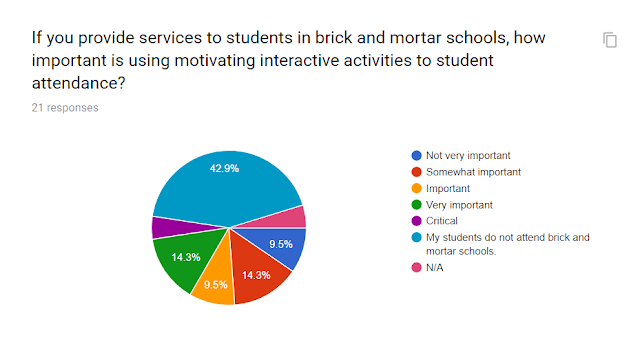
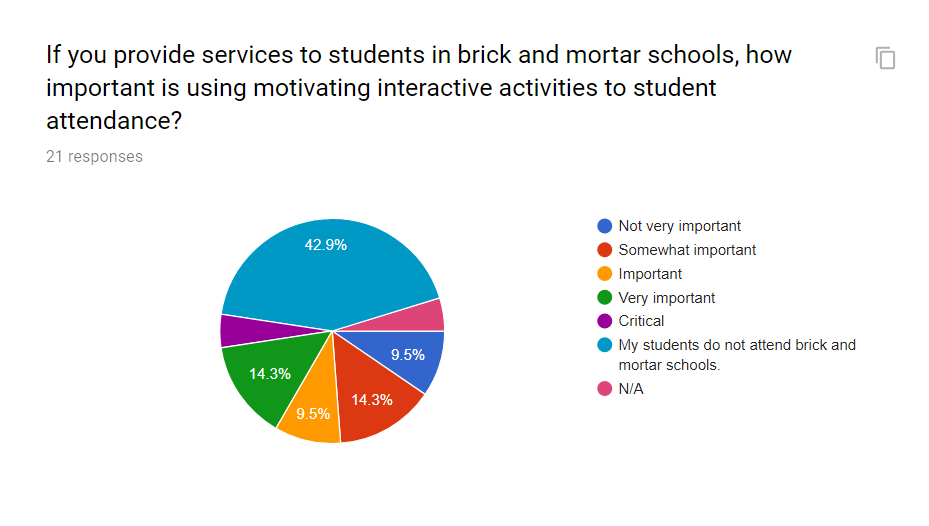
Several weeks ago, I posted a 6-question survey on the Teletherapy Materials for Speech-Language Pathologists Facebook page. The purpose of the survey was to gather information from practicing teletherapists regarding their opinions about the role that motivating materials played in the success of sessions. By no means was this a scientific survey. But it helped shed light on my personal burning questions related to the amount of time I had been spending creating and adapting activities for use with my students in telepractice. I enjoyed making my own customized activities but also purchased many excellent appropriate materials on TpT specifically for telepractice or that could be easily adapted. I had tremendous respect for our TpT sellers and the amount of time, effort, and creativity they invested in making such activities available. My survey came from wondering if I was the only one spending tons of non-paid time planning and creating telepractice friendly activities. Was I missing something? Was there some magic website I wasn't aware of? Were some platforms easier to use? What was my problem? Given the results below, it appeared that having access to motivating appropriate activities and materials was important to many telepractioners. Having access to materials or a budget to purchase materials would be a significant plus for teletherapy companies looking to attract and keep therapists. Also, when interviewing, therapists should feel justified in asking about how a company provided access to materials to use with their platform.




Getting Started in Teletherapy
As I was listening to Episode 2: Expert Advice from Tracy Sippl from Andee Szwabowski's podcast, I heard them discuss how often SLP's asked them to explain the way to get started in telepractice. I began thinking how powerful it was to hear details of Tracy's personal journey. Listening to individual stories helped me to wrap my head around teletherapy. When I heard the stories of others, I listened and looked for pieces of myself. Listening to personal experiences of practicing teletherapists often answered "nuts and bolts" questions and helped me to formulate new questions. I pondered how I could model their successes and learn from their struggles. I thought about how to synthesize what I knew with what I was learning. As a newbie teletherapist myself, with only one year of experience, I encourage telepractice-curious or just-signed-a-contract SLP's to listen to Andee's podcasts. Take notes, write down your questions, and reflect on them.


Thursday, July 12, 2018
Teletherapy: Office Design Part 1

 |
| Fly swatter adds a nice touch, don't you think? |
I transformed my old dining room table, plus two leaves, into my amazing desk. I have room for two monitors and ample space to use my document camera to share books and activities. I keep my printer on a cart that rolls under the table. I also have room to stow my paper shredder. The area behind the desk has short book shelves and filing cabinets. I wanted to keep the space that students would see behind my face while on the webcam as clear as possible. The window provides wonderful natural light.
Teletherapy: How to Create Game Stamps in Adobe Acrobat Reader Part 2
In How to Create Game Stamps in Adobe Acrobat Reader Part 1, I explained how to create images as PDF's that can be used in Acrobat Reader. In Part 2, I will show you how to save your PDF images so they can be used as game stamps with any game board that is also saved as a PDF using Acrobat Reader. To make your saved PDF images into game stamps, open a PDF document or game board in Acrobat Reader. Click on Comment in the side tool bar. There should be a yellow speech bubble by it. This will bring up another tool bar that appears at the top. Select the game stamp icon. Scroll down to select custom stamp and choose "create". A new dialog box will appear. Click on browse to surf through your own saved PDF images. Select the one you want and it will appear in the dialog box. Remember, it MUST BE A PDF. Create a category and name for the stamp and save it.


Teletherapy: How to Create Game Stamps in Adobe Acrobat Reader Part 1
As a novice telepractioner, saving money is important. Learning how to utilize game boards I had already made to use in my former brick and mortar school in Adobe Acrobat Reader has been critical. Adobe Acrobat Reader is free and allows you to view and mark up PDF's. After downloading Acrobat Reader, the next step is creating or saving game boards as PDF's. When a game board PDF is opened in Acrobat Reader, you will see some tools on right side. Select the comment icon, which adds another tool bar at the top.


.


Teletherapy: Using Board Games in Telepractice

Games. Sometimes when students are asked what they have been working on in speech, they respond with, “We play games.” With a cringe, SLP’s hope that the student and their family have a solid understanding of their speech goals. On the other side of the coin, games are motivating and productive speech and language therapy activities. I use a lot of games—all types of games with students. But the one thing I have learned about games and therapy is that a game is only as good as the quality and quantity of student responses that it helps me to facilitate. When I use games, it is less about the game and more about how I am able to cue the student. In teletherapy, interactivity is a factor I am constantly attending to. As the SLP, I still need a level of control that allows me to respond to the student's speech and language output and how to further cue the student. For me, there is an interactivity “comfort zone” when the child is engaged in a telepractice session.
Thursday, April 26, 2018
Teletherapy: Using a Document Camera Part 3

Tuesday, April 17, 2018
Teletherapy: Using a Document Camera Part 2

Books. Books. More books. I love books—all kinds of books and when I started using a document camera to share my favorites, a huge weight was lifted from my nervous telepractionershoulders. Once again, I had the ability to share a book, using my voice, stopping when I thought it made sense, and thinking aloud to facilitate comprehension strategies in response to the child. And here is the amazing part, I had the ability to zoom in and zoom out on parts of illustrations, words, and sentences. That power to show parts while hiding others is a useful tool for facilitating inferential thinking, questioning, and synthesizing. Bring on the delicious wordless picture books! The wordless book used in the video clip below is The Red Book by Barbara Lehman.
Monday, April 16, 2018
Teletherapy: Using a Document Camera--Part 1
 |
| Thank you to Chelsea DiMarzio, one of my managers, for encouraging me to try a document camera and giving me new ideas for planning telepractice therapy sessions. |
Subscribe to:
Posts (Atom)